Table of Contents
Types of Constants
Constants are fixed values that do not change during program execution. Here are the types of constants based on the type of value they represent: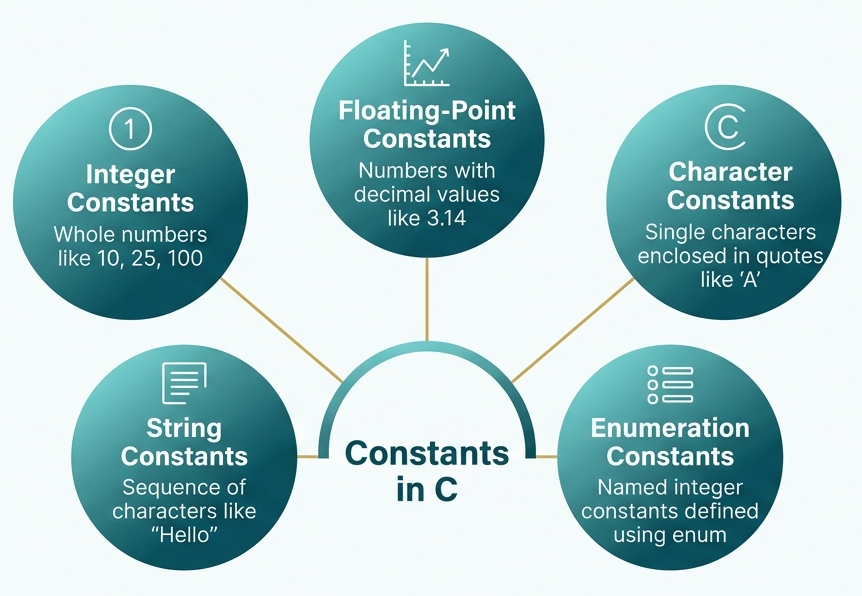
1. Integer Constants
- These are whole numbers without a fractional part.
- Integer constants can be decimal, octal, or hexadecimal.
- They can be signed or unsigned.
// C program to show integer constants
#include stdio.h

// Main function
int main()
{
  // decimal
  int decimal = 100;

  // octal (equals 10 decimal)
  int octal = 012;

  // hexadecimal (equals 31 decimal)
  int hex = 0x1F;

  printf("Decimal: %d\n", decimal);
  printf("Octal: %d\n", octal);
  printf("Hexadecimal: %d\n", hex);

  return 0;
}
Output:
Decimal: 100
Octal: 10
Hexadecimal: 31
2. Floating-Point Constants
- These are the numbers with a decimal part or in exponential form.
- The default type is double.
// C program to show floating-point constants
#include stdio.h

// Main function
int main()
{
  // float constant
  float pi = 3.14f;

  // double constant
  double e = 2.71828;

  // exponential notation (1500.0)
  double sci = 1.5e3;

  printf("Float: %.2f\n", pi);
  printf("Double: %.5lf\n", e);
  printf("Scientific: %.1lf\n", sci);

  return 0;
}
Output:
Float: 3.14
Double: 2.71828
Scientific: 1500.0
3. Character Constants
- A character constant is enclosed in single quotes ‘ ‘.
- It is internally stored as an ASCII integer value.
// C program to show character constants
#include stdio.h

// Main function
int main()
{
  char grade = 'A';
  char symbol = '$';
  char digit = '7';

  printf("Grade: %c\n", grade);
  printf("Symbol: %c\n", symbol);
  printf("Digit: %c\n", digit);

  return 0;
}
Output:
Grade: A
Symbol: $
Digit: 7
4. String Constants
- A sequence of characters enclosed in double quotes “ “.
- Automatically terminated with a null character \0.
// C program to show string constants
#include stdio.h


// Main function
int main()
{
  char name[] = "Alice";
  char greeting[] = "Hello, World!";


  printf("Name: %s\n", name);
  printf("%s\n", greeting);


  return 0;
}
Output:
Name: Alice
Hello, World!
5. Enumeration Constants
- These are named integer constants that are grouped using enum.
- These make the code more readable and manageable.
// C program to show enumeration constants
#include stdio.h


enum Weekday { MON, TUE, WED, THU, FRI, SAT, SUN };


// Main function
int main()
{
  enum Weekday today = WED;

  // WED is 2 (starts from 0)
  printf("Day number: %d\n", today);
  return 0;
}
Output:
Day number: 2
Defining Constants
There are two main ways to define constants in C: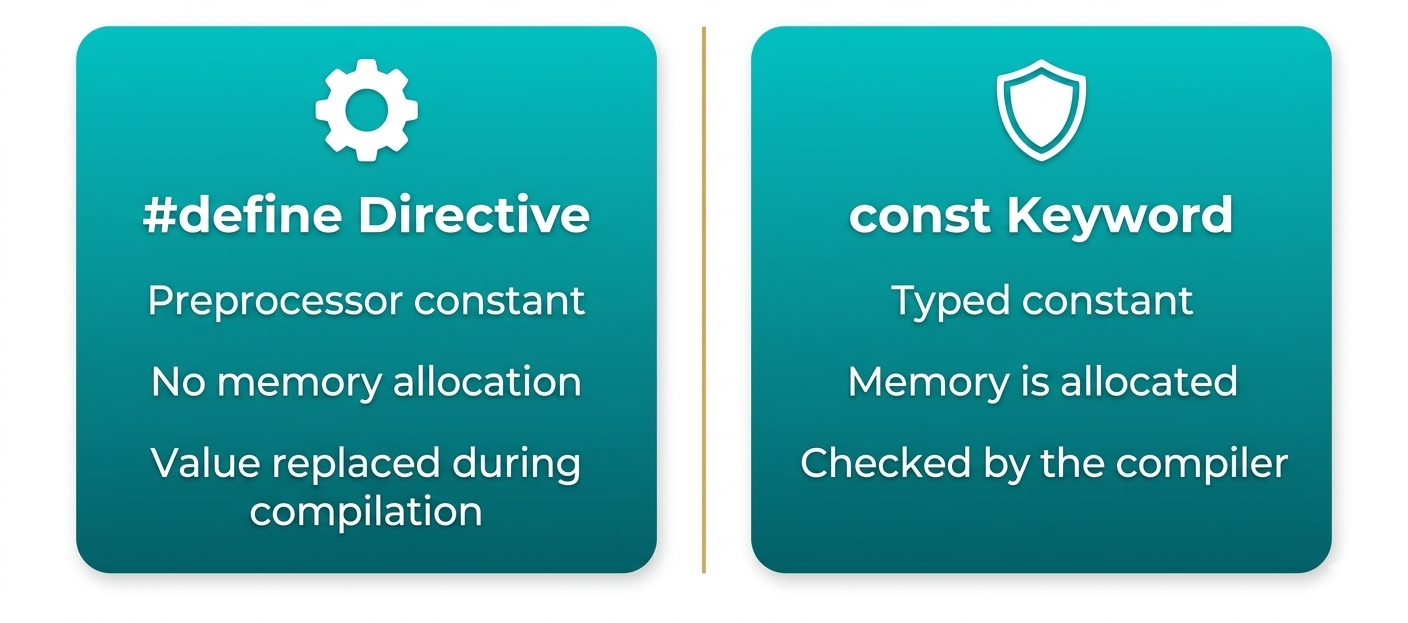
Using #define Preprocessor Directive
- The #define directive defines a symbolic constant.
- No memory is allocated for it.
- The compiler replaces every occurrence of the name with its value during preprocessing.
Example:#define CONSTANT_NAME value
// C program to show defining constants
// using #define
#include stdio.h

#define PI 3.14159
#define MAX_STUDENTS 50

// Main function
int main()
{
  printf("Value of PI: %.5f\n", PI);
  printf("Maximum students: %d\n", MAX_STUDENTS);
  return 0;
}
Output:
Value of PI: 3.14159
Maximum students: 50
Using const Keyword
- The const keyword defines a typed constant that occupies memory.
- Unlike #define, it is type-checked by the compiler.
Example:const data_type constant_name = value;
// C program to define constant using
// const keyword
#include stdio.h

// Main function
int main()
{
  const float PI = 3.14159;
  const int MAX = 100;

  printf("PI = %.5f\n", PI);
  printf("MAX = %d\n", MAX);

  // PI = 3.14;
  // Error: cannot modify a const variable
  return 0;
}
Escape Sequence in Constants
Escape sequences are special characters that are used to represent characters that are not easily typed or have special meanings. They are used in character or string constants. An escape sequence starts with a backslash (\) followed by a specific character.| Escape Sequence | Meaning | Example |
|---|---|---|
| \n | Newline (moves cursor to the next line) | printf("Hello\nWorld"); |
| \t | Horizontal tab | printf("Name:\tAlice"); |
| \\ | Backslash (\) character | printf("C:\\Program Files"); |
| \' | Single quote character (') | printf("It\'s OK"); |
| \" | Double quote character (") | printf("She said \"Hi\""); |
| \r | Carriage return | printf("Hello\rWorld"); |
| \b | Backspace | printf("Helloo\b"); |
| \f | Form feed | Rarely used |
| \v | Vertical tab | Rarely used |
Example:
// C program to show excape sequences
#include stdio.h

// Main function
int main()
{
  const char NEWLINE = '\n';
  const char TAB = '\t';
  const char BACKSLASH = '\\';
  const char QUOTE = '\"';

  printf("Hello World!%c", NEWLINE);
  printf("Name:%cJohn Doe%c", TAB, NEWLINE);
  printf("File path: C:%cProgram Files%c", BACKSLASH, NEWLINE);
  printf("Quote Example: %cThis is in quotes%c%c", QUOTE, QUOTE, NEWLINE);

  return 0;
}
Output:
Hello World!
Name: John Doe
File path: C:\Program Files
Quote Example: "This is in quotes"
Rules for Writing Constants
Here are some simple rules to keep in mind to keep your code clean:- Use Meaningful Names: Pick names that clearly describe what the constant represents.
- Follow Naming Convention: Constants are usually written in uppercase letters with underscores separating words.
- Cannot Be Modified: Once a constant is defined, its value cannot be modified or changed during the program execution. Any attempt to change the value will result in a compilation error.
- Valid Characters: Names can contain letters, digits, and underscores. They cannot start with a digit, and cannot include spaces or special symbols.
- Avoid Reserved Keywords: Constant names should not be the same as C keywords like int, return, float, etc.
- Use #define and const carefully:
- Use #define for symbolic constants without a type.
- Use const when you want a typed constant that the compiler can check.
Conclusion
In C programming, constants are fixed values that remain unchanged throughout your program, providing stability unlike variables. They come in various types, including integers, floating-point numbers, characters, and strings, along with enumeration constants for better readability. You can define them using the #define preprocessor directive for simple substitutions or the const keyword for type-checked, unchangeable constants. Proper use of constants, with clear naming, leads to more robust, readable, and predictable C code.Frequently Asked Questions
1. What is a constant in C?2. How are constants defined in C?A constant in C is a fixed value that cannot be changed during program execution.
3. What is the difference between a constant and a variable?Constants can be defined using the #define preprocessor directive or the const keyword.
4. Why are constants useful in programming?A variable can change its value during execution, while a constant keeps the same value throughout the program.
5. What are escape sequences in C?Constants improve code readability, prevent accidental changes, and make programs easier to maintain.
Escape sequences are special characters (like \n or \t) used in strings or characters to represent actions such as new lines or tabs.

0 Comments